
Our test picture came out rather well (singer Clarissa J. Rawkis, seen above in a full sized image directly from an actual camera). This was a first try, indoors with existing light.
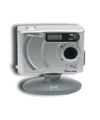
The IQuest is shaped somewhat like a small little disposable camera (I’ve been using those little $12 Kodak cameras for quick shots where I can’t take my Mintola SLR).
It has a standard tripod socket, comes with two AA batteries (used primarily for the electronic flash), a small quarter size battery (the same one used by those old 126 cameras) for standby power. There is a monochrome LCD screen on back of the camera which shows you information about the camera mode. A USB cord (which provides the camera power when connected to your PC) is provided along with two CD-R software disks (the TWAIN driver, MGI PhotoSuite III SE, Odyssey Multimedia Gallery Inetcam, iVISTA, Adobe Acrobat Reader, Owner's manual in PDF format). The actual software you need to install is the first item on the main disk.
The IQuest comes with a toll free support number (8 am to 6 pm Pacific Time on week days) plus you can get e-mail support at their web site.

 CMOS sensors have built-in amplifiers and clocks to regulate the output of data from the image sensory areas. That uses less power than CCDs. CCDs are an older technology that were once superior (this is not longer the case) because they had less visual noise, they require, however, external clock and amplification circuits.
Also remember the number of pixels used determines the resolution and price of a given unit. Virtuall all of these hi rez web cams use rather small pixel clusters as compared to high priced Digital Cameras and Digital Video, but these web cams are also a fraction of the price!
Finally remember that all low end digital cameras use a single chip with a matrix of colors (see our video history article from our Digival Video and Television special last year) and there is some color bleed over white objects even in cameras priced over $1,000! The bleed does not vanish until you go to a camera with three separate CCD or CMOS chips, each having a single color filter. In DV these cameras cost over $3,000.
The rest of these cameras are of a very similar nature (the IC used is probably from the same source in some instances) but there are structural differences of an aesthetic nature that may be of interest to diffrent people!
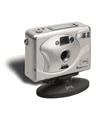
 Aiptek PocketCam Classic is a very small camera that fits in the palm ofyour hand and looks like a classic rangefinder camera of the 1950s.
It can take 7 to 20 seconds of motion video, 107 low rez (320 x 240) and 26 hi rez (VGA 640 x 480), plus it also can generate XGA (1024 x 768) using interpolated software (thus it is not a true oversize image, but a manipulated VGA image). With 8 MB of SDRAM. Unlike the SiPix there is no built-in flash unit.
Two AAA batteries (which are sometimes hard to find and more expensive).

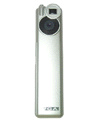
Dolphin FASTUSB-1007 Digital Pocket VGA USB 1.1 Camera
Designed along the lines of the Minox spy camera, tall and thin. It fits in your pocket much like a large pen. The specifications and AAA batteries are similar to the Aiptek shown above. Again, no flash unit...
Creative WebCam Go ES
From the makers of Sound and Video Blaster this camera has 16.7 million colors in 160x120, 320x240 and 640x480 modes. It takes 30 FPS full motion video at 320 (QVGA) and 15 FPS at VGA (640). It has 8MB of memory.
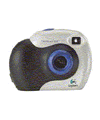 Logitech Clicksmart 310
USB Digital video capture speed 15 fps (digital camera mode); 30fps (Web camera mode) Digital video capture resolution 176x144 pixels (digital camera mode); 640x480 pixels (Web camera mode) Still image format JPEG Still image capture resolution Up to 352x288 (digital camera mode); up to 640x480 pixels (Web camera mode).
 Ezonics EZMega CamEZ-802
Similar to the SiPix IQuest, except this camera from Ezonics is a full mega pixel camera capable of generating a slightly higher quality than the 72 DPI 640 x 480 found in most of the other digital cameras listed above and taking up to 800 x 600 pixel images, but the number of images drops considerably. The price of this camera is, however, slighly more than some of the other offerings. While is, like the SiPix cameras, has an electronic flash, there was no indication that this camera had a removable memory card.
Dedicated Web Cams that do 640 x 480 higher resolution imaging.
Ezonics Phone Cam EZ-389
This is not a portable or removable camera, but a dedicated visual phone that includes a web cam and a microphone. It’s designed for families to use to see and hear each other over a system such as Yahoo Instant Messenger or MSN Net Meeting.
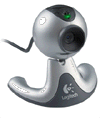 QuickCam Pro 3000 USB
Like the Ezonics this also has a built-in microphone.
IBM Net Camera Pro
Another USB web cam that uses CCD technology. Unlike most of the other camera this one has a twist knob lens that adjusts the focus from close up to infinity.
 iBOT Firewire Desktop Video Camera
This one uses the faster data transfer from Apple, Firewire. This camera also has a ¼” CCD capable of R-G-B, and YUV 4:4:4 (full color for each pixel), 4:2:2 (professional electronic field production color for every other pixel) or 4:1:1 (semi-professional electronic news gathering color every forth pixel). Most digital cameras and MPG use 4:2:0 (which does not seem to be supported here) which takes color from two pixels in a checkboard pattern on mutliple rows instead of a single row).
This is a very interesting dedicated, possibly ultra high qulaity 640 x 480 camera that may not have the flaws and defects seen around the edges (digitial video noise) or the color fringe.
In theory the iBOT is comprable in image gather quality to a $500 DV Mini camera, without the portablity or zoom lens!
This may outperform most other $50-$100 web cams, however you must have a Firewire port on your computer as other camera use the slower but more readily avaiable USB port.
Driver Installation Problems
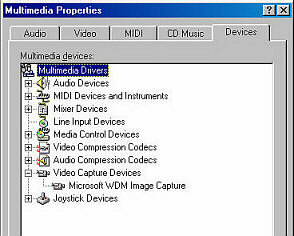 In order to use any web cam you must have Video For Windows (VFW) and the WDM drivers installed. This will be for the camera source. If these drivers aren't installed you will need to ADD/REMOVE programs in the Windows Set-up. Select Mutli-Media and make sure all drivers are added to your system.
To verify this, go to your START, select SETTINGS, select CONTROL PANEL, select MUTLIMEDIA, select DEVICES and see if the WDM Video Capture device is listed.
In testing out these web cams I had an installation problem that turned out to be quite a common one! There was an RPC Stud error which prevented the TWAIN driver from installing (TWAIN drivers are used in scanning images into photo programs). In researching the problem I found out it was quite wide spread and found a quick solution
posted by Amaralliya E. Thenardier
at the Windows 98 Annoyances Discussion Forum
Hit start -> run, type in sfc and hit enter. Select extract one file from installation disc and type in oleaut32.dll, then hit start. In the next window, in the restore from field, enter the location of the windows install cabs (if you have a windows install disc, it'll be x:\win98\, where x is the letter of the cd-rom drive [commonly 'd:'] - if not, try c:\windows\options\cabs\). Leave the save file in path as c:\windows\system\ and hit ok. leave the backup folder path as c:\windows\helpdesk\sfc\ and hit ok (create it not already there). It should tell you that the file was successfully replaced. you may need to reboot.
Not only did this solve my driver installtion problem, but it also solved a problem I was having spawning extra Internet Explorer browser!
See, you can easily kill two birds with one stone if you pick the right web cam...!
© 2001-2005 Issues
Magazine.






All Rights Reserved.
[email protected]